Voxel Art Explained: Styles, Tools & How to Create It
Voxel art is 3D pixel art — models built from cubic cells on a grid. Learn what it is, the main styles, the best software, and how AI speeds it up.
Voxel art is what you get when you apply the principles of pixel art to three dimensions. Instead of placing colored squares on a 2D canvas, you place colored cubes on a 3D grid. The result is the chunky, expressive aesthetic you know from Minecraft, Teardown, and a generation of indie games.
It’s not a primitive technique held over from hardware limitations. It’s a deliberate artistic choice — one that’s found a permanent home in game development because it balances aesthetic clarity with workflow efficiency.
What is voxel art?
A voxel is a volumetric pixel: a single cubic cell in a 3D grid that holds a color or material value. Voxel art is the practice of composing those cells into objects, characters, and environments.
The defining characteristic is discretization — everything exists at integer coordinates on a fixed grid. There are no smooth curves, no continuous surfaces. Every edge is a right angle. Surfaces are flat planes of uniform cells. This constraint is the entire point: it forces a kind of designed simplicity that reads clearly at any scale.
A brief history
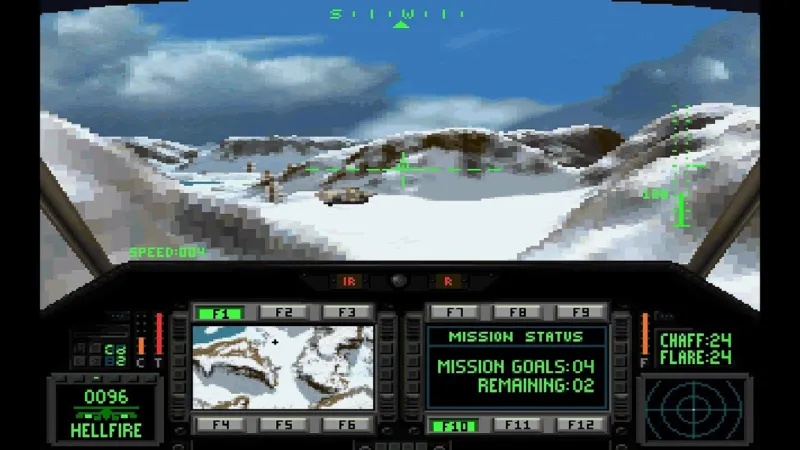
Voxel rendering appeared in the late 1980s and early 1990s in games like Comanche (1992), which used height-field voxels for its terrain. The approach was dropped almost industry-wide when polygon rendering became feasible — polygons scaled better and matched the physically-based rendering techniques the industry wanted.
The aesthetic resurgence came with Minecraft (2009). It wasn’t technically a traditional voxel game (it used a chunk-based block system rather than a true voxel grid), but it established the block-building aesthetic in mainstream culture. The indie wave that followed produced dedicated voxel tools and a defined art community.
Today, voxel art is a first-class aesthetic in indie games, animated shorts, and game asset stores. Tools like MagicaVoxel lowered the barrier dramatically, and AI generation is lowering it further.
The main styles
Voxel art isn’t a single look. Across the board, there are multiple styles that can be merged, or distinct. Here are some examples of some popular Voxel art styles:
Isometric voxel art

designed to be viewed from a fixed 45° angle. The isometric style emerged from classic strategy games from trying to simulate a large 3D environment with 2D tiles. Nowadays, there are still a few isometric games that use this style, such as Crossy Road. It is mostly the type of camera and perspective used that makes this style, so you can mix it with most of the other styles in this guide.
Rigged Animation Voxel Art

A type of animation where character body parts use programmed bones to move the entire voxel body part. Depending on the style, it can either be separate body parts — as in older-style Roblox and Minecraft characters — or use weighted blending between body parts, which is less common with voxels and seen in newer versions of Minecraft.
Animated voxel

This is the closest you can get to proper voxelart animation. movement is defined by a different placement of voxels on the scene, just like how traditional pixel art works. It usually gives off a stop-motion quality, and voxel rotation is not possible.
Voxel art software
There are a few tools to select from when you want to start creating Voxel art. Some includes:
MagicaVoxel — the free standard. A self-contained voxel editor with a GPU renderer, animation support, and an active community sharing .vox files. Its interface is minimal but powerful for manual work. No AI features. The de-facto starting point for learning voxel art.
Goxel — open-source, cross-platform including mobile. Simpler than MagicaVoxel, good for quick models. No animation timeline.
Qubicle — paid, Unity/Unreal plugin-aware, designed for game studio pipelines. Better rigging and export options than MagicaVoxel, weaker renderer.
VoxelAI Studio — AI-first generation with a built-in editor. Type a text prompt and generate a game-ready model in 15-60 seconds. The editor supports manual refinement after generation. Exports .vox, .glb, .obj, .gltf directly. Designed for game developers who need volume: many assets, fast.
Manual creation vs AI-assisted creation
- 1.Open editor, set grid dimensions (e.g. 32×32×32)
- 2.Select palette — 8 to 16 colors
- 3.Place voxels cell by cell, sculpting shape
- 4.Iterate on silhouette and surface detail
- 5.Export when satisfied to .obj, .ply, or .vox file formats
- 6.Time: 30 min (prop) to several hours (character)
- 1.Type a text prompt describing the asset
- 2.Generate reference images, then the model in 60 seconds
- 3.Review output, tweak prompt if needed
- 4.Refine in the built-in editor
- 5.Export as .vox, .glb, .obj, or .gltf
- 6.Time: 5 to 10 min per asset, iterable
Hand-crafted models usually reach a higher quality ceiling, but AI iterates far faster — and it can give artists a finished starting point to refine, which speeds the whole process up a lot.
For most indie teams, the right workflow is hybrid: Use AI for all generations, and then refine manually characters and important props.
Getting the most out of voxel art
Voxel art has no rules, but following some will help you get the most out of it.
- Constrain your palette. Eight to sixteen colors produces more coherent results than an unconstrained range. Just like other mediums such as painting or film, The color palette will define your world’s visual style.
- Design for the silhouette first. A silhouette conveys more than surface detail does — movement, emotion, and personality all read from the outline before anything else.
- Break up flat surfaces. Large uniform planes look lifeless. Displace a few voxels, vary the color slightly, or add small details so every surface larger than a few cells has something to catch the eye.
For a deeper dive on technique, see 5 Voxel Art Techniques That Make Your Game Worlds Feel Alive.
Try it in VoxelAI Studio
VoxelAI Studio’s free tier includes 50 tokens — enough to generate several models and see the workflow in action. If you already have a MagicaVoxel library, you can import existing models into the editor and use AI generation to extend your asset set in a consistent style.